Almanac Entries for Obsidian Daily Notes
I find it very helpful to know the state of the sky in my Craft, but I’m often too lazy to look it up. Here is how I got the almanac-like data I wanted into my Obsidian Daily Notes.
Settings
- Install, Enable, and Configure Plugins:
- Daily Notes (core) or Periodic Notes by Liam Cain
- Use Templates/Daily Note.md for your Daily Note template
- Templater by SilentVoid
- Trigger Templater on new file creation
- Use Templates as your template directory
- Daily Notes (core) or Periodic Notes by Liam Cain
- Create a template for your Daily Notes, and set it in Daily Notes or Periodic Notes. Include the snippet below.
- When you create your next Daily Note using the Daily Note button in Obsidian’s toolbar, it should populate for you automatically.
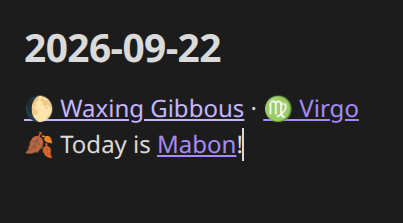
Code Snippet for Moon Phase, Zodiac Sign, and Next Upcoming Pagan Holiday in the Wheel of the Year
<%*
const noteDate = tp.file.title.match(/^\d{4}-\d{2}-\d{2}/) ? moment(tp.file.title, "YYYY-MM-DD").toDate() : new Date();

const synodicMonth = 29.53058867;
const knownNewMoon = new Date(Date.UTC(2000, 0, 6, 18, 14, 0));
const diffDays = (noteDate - knownNewMoon) / 86400000;
let phase = (diffDays % synodicMonth) / synodicMonth;
if (phase < 0) phase += 1;

const moonNames = ["New Moon","Waxing Crescent","First Quarter","Waxing Gibbous","Full Moon","Waning Gibbous","Last Quarter","Waning Crescent"];
const moonEmojis = ["🌑","🌒","🌓","🌔","🌕","🌖","🌗","🌘"];
const moonIndex = Math.floor(phase * 8 + 0.5) % 8;

const m = noteDate.getMonth() + 1;
const d = noteDate.getDate();
const md = m * 100 + d;
let sign, signEmoji, signNum;
if (md >= 321 && md <= 419) { sign = "Aries"; signEmoji = "♈"; signNum = 1; }
else if (md >= 420 && md <= 520) { sign = "Taurus"; signEmoji = "♉"; signNum = 2; }
else if (md >= 521 && md <= 620) { sign = "Gemini"; signEmoji = "♊"; signNum = 3; }
else if (md >= 621 && md <= 722) { sign = "Cancer"; signEmoji = "♋"; signNum = 4; }
else if (md >= 723 && md <= 822) { sign = "Leo"; signEmoji = "♌"; signNum = 5; }
else if (md >= 823 && md <= 922) { sign = "Virgo"; signEmoji = "♍"; signNum = 6; }
else if (md >= 923 && md <= 1022) { sign = "Libra"; signEmoji = "♎"; signNum = 7; }
else if (md >= 1023 && md <= 1121) { sign = "Scorpio"; signEmoji = "♏"; signNum = 8; }
else if (md >= 1122 && md <= 1221) { sign = "Sagittarius"; signEmoji = "♐"; signNum = 9; }
else if (md >= 1222 || md <= 119) { sign = "Capricorn"; signEmoji = "♑"; signNum = 10; }
else if (md >= 120 && md <= 218) { sign = "Aquarius"; signEmoji = "♒"; signNum = 11; }
else { sign = "Pisces"; signEmoji = "♓"; signNum = 12; }

// In the real Notes vault, this points across vaults, at Grimoire, via
// Templater-built obsidian:// URIs, since [[wikilinks]] can't cross vaults.
// Here everything lives in one vault, so a plain wikilink works instead.
function referenceLink(relPath, label) {
  return `[[${relPath}|${label}]]`;
}

const moonLink = referenceLink(`References/Moon Phases/${moonIndex + 1} ${moonNames[moonIndex]}`, `${moonEmojis[moonIndex]} ${moonNames[moonIndex]}`);
const signNumPadded = String(signNum).padStart(2, "0");
const signLink = referenceLink(`References/Zodiac Signs/${signNumPadded} ${sign}`, `${signEmoji} ${sign}`);

const holidays = [
  { name: "Imbolc",     md: "02-01", emoji: "🕯️" },
  { name: "Ostara",     md: "03-20", emoji: "🌸" },
  { name: "Beltane",    md: "05-01", emoji: "🔥" },
  { name: "Litha",      md: "06-21", emoji: "☀️" },
  { name: "Lughnasadh", md: "08-01", emoji: "🌾" },
  { name: "Mabon",      md: "09-22", emoji: "🍂" },
  { name: "Samhain",    md: "10-31", emoji: "🎃" },
  { name: "Yule",       md: "12-21", emoji: "❄️" },
];
const holidayFolder = "Wheel of the Year";

const year = noteDate.getFullYear();
const todayMD = `${String(m).padStart(2, "0")}-${String(d).padStart(2, "0")}`;
const holidaysNumbered = holidays.map((h, i) => ({ ...h, num: i + 1 }));
const todayHoliday = holidaysNumbered.find(h => h.md === todayMD);

let holidayLink;
if (todayHoliday) {
  holidayLink = `${todayHoliday.emoji} Today is ${referenceLink(`References/${holidayFolder}/${todayHoliday.num} ${todayHoliday.name}`, todayHoliday.name)}!`;
} else {
  const withDates = holidaysNumbered.map(h => {
    const [hm, hd] = h.md.split("-").map(Number);
    let hDate = new Date(year, hm - 1, hd);
    if (hDate < noteDate) hDate = new Date(year + 1, hm - 1, hd);
    return { ...h, date: hDate };
  }).sort((a, b) => a.date - b.date);
  const next = withDates[0];
  const dateStr = next.date.toLocaleDateString("en-US", { month: "long", day: "numeric" });
  holidayLink = `${next.emoji} ${referenceLink(`References/${holidayFolder}/${next.num} ${next.name}`, next.name)} arrives ${dateStr}`;
}

tR += `${moonLink} · ${signLink}\n${holidayLink}`;
-%>